
Mastering Data Structures in TypeScript (With Easy Code Examples)
Learn how arrays, stacks, queues, linked lists, and more work — all explained simply using TypeScript.

Introduction
Data structures are fundamental building blocks in programming that help organize and manage data efficiently. We'll explore key data structures in TypeScript—such as arrays, tuples, dynamic arrays, stacks, queues, linked lists, hash maps, sets, and trees. Each section will provide a clear definition, practical use cases, and TypeScript code examples.
This guide aims to strengthen your grasp of data structures in a TypeScript environment.
Arrays
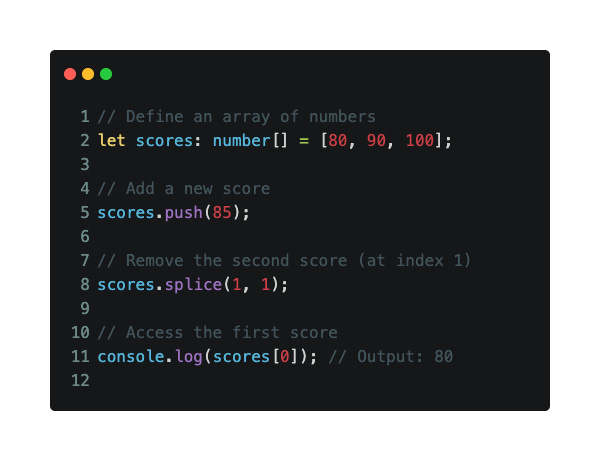
An array is a simple way to store a list of items. It keeps them in order, and you can access any item using its position (called an index).
In TypeScript, you can define an array with a specific type to make your code safer.
✅ Key Features:
Ordered list of elements
Each item is stored at a number-based index
Can have fixed or dynamic size
All items usually share the same type
🛠️ Use Cases:
Store a list of numbers, names, products, etc.
Access or update values using their position
Loop through values for processing
⏱️ Time Complexity:
Add at end (
push):O(1)Remove in middle (
splice):O(n)Access by index:
O(1)
💡 Tip:
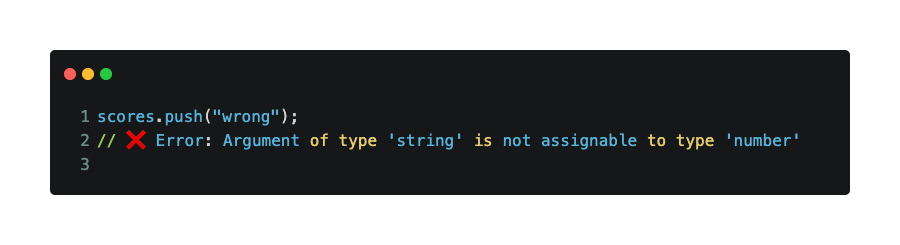
TypeScript helps catch bugs early. For example, if you try to push a string into a number array, it will show an error:
Tuples
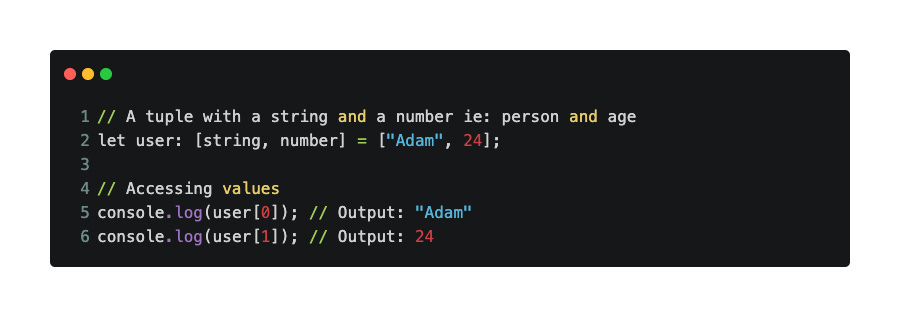
A tuple is like an array — but with a twist. It has a fixed length and each item can be of a different type.
Think of a tuple as a mini-structure for storing related but different types of data in order.
✅ Key Features:
Fixed size and order
Can hold multiple types (e.g., string + number)
Good for structured data with a known format
🛠️ Use Cases:
Store a person’s name and age
Return multiple values from a function
Represent small records like [statusCode, message]
⏱️ Time Complexity:
Access by index:
O(1)
💡 Tip:
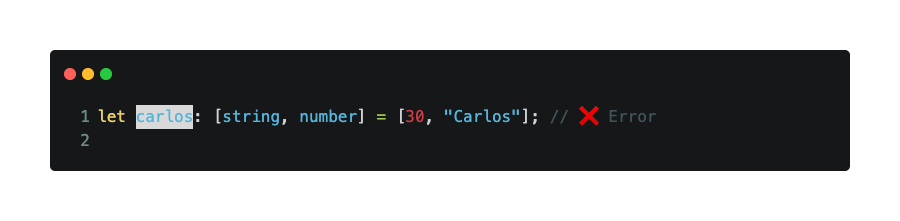
You must follow the correct order and types when using tuples.
ArrayList (Dynamic Arrays)
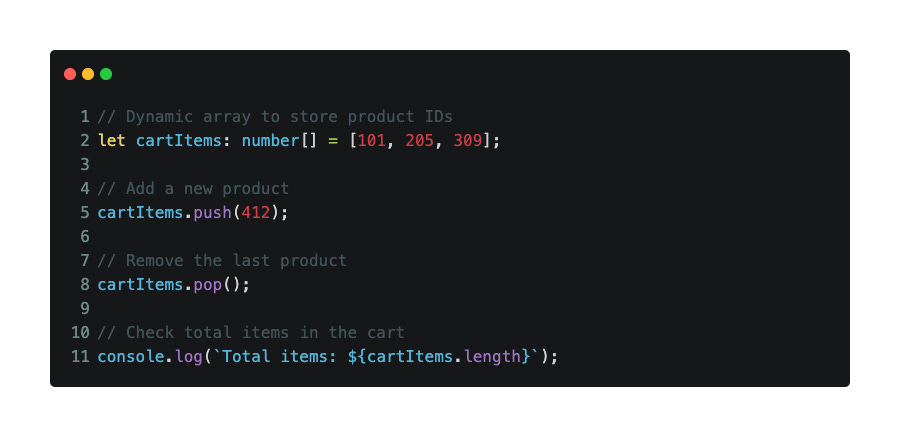
A dynamic array is an array that can grow or shrink in size as needed. In TypeScript, this is just a regular array, but we call it “dynamic” when we frequently add or remove items.
Unlike fixed-size arrays in some languages, JavaScript/TypeScript arrays automatically resize in the background.
✅ Key Features:
Resizes automatically
Maintains the order of elements
Fast access by index
Useful when the number of items changes often
🛠️ Use Cases:
Shopping cart items
Task lists
Collecting data from user input
⏱️ Time Complexity:
Add at end (
push):O(1)(amortized)Remove from end (
pop):O(1)Access by index:
O(1)
💡 Tip:
Avoid using splice too often on large arrays unless needed, as it’s slower than push or pop.
Stack
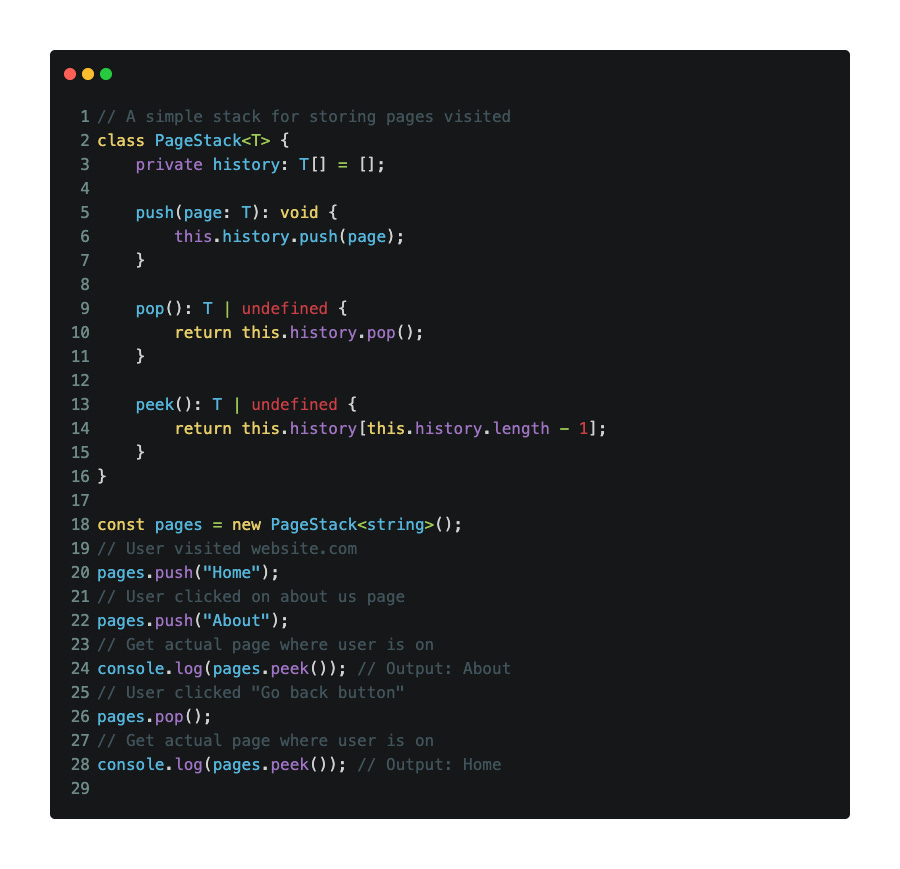
A stack is a data structure that works like a pile of plates — you add items to the top, and remove from the top. This is called Last In, First Out (LIFO).
Only the last item added is available for removal or viewing.
✅ Key Features:
Add with
push(), remove withpop()Use
peek()to see the top item without removing itOnly the top is accessible at any time
🛠️ Use Cases:
Undo/redo features
Navigating browser history
Function call management
⏱️ Time Complexity:
Push:
O(1)Pop:
O(1)Peek:
O(1)
💡 Tip:
Use generics (<T>) so your stack can hold any type: numbers, strings, or even objects.
Queue
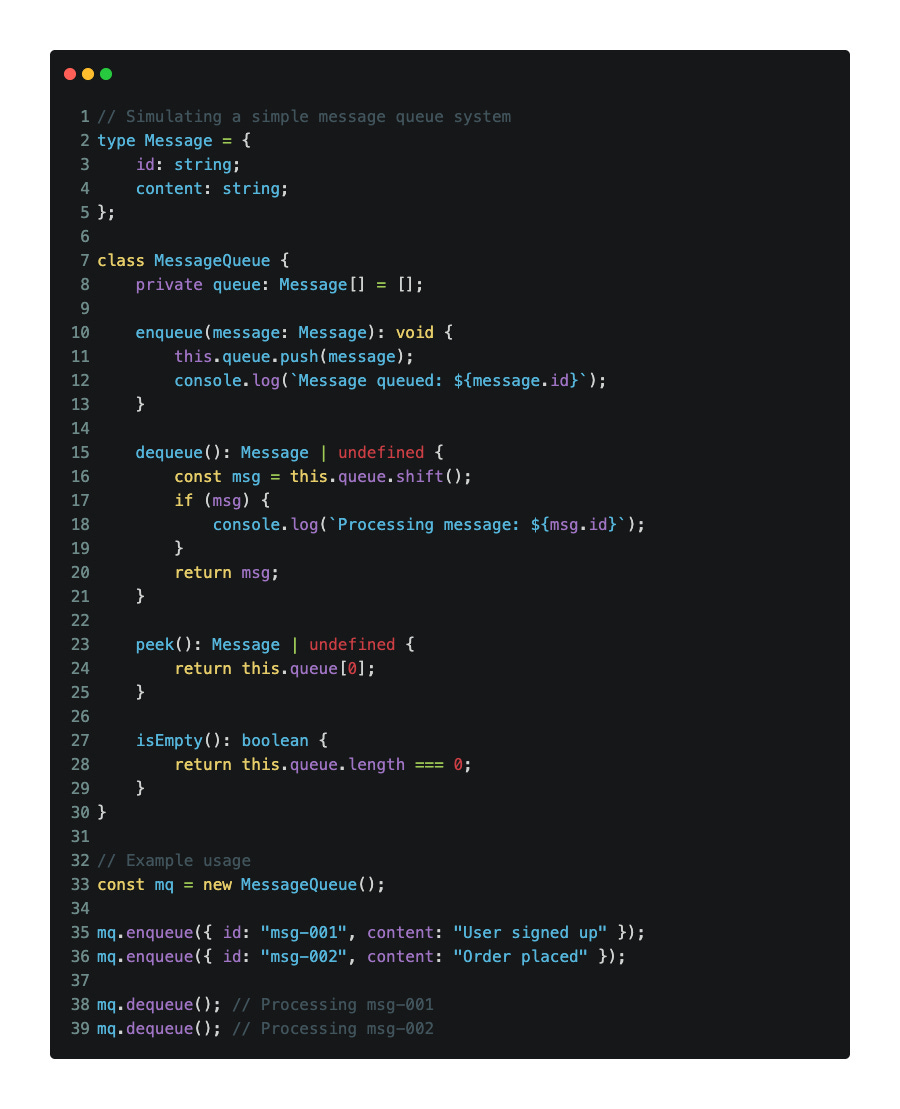
A queue is a data structure that works like a line at the grocery store — the first person in line is the first one served. This is called First In, First Out (FIFO).
You add items at the end and remove from the front.
✅ Key Features:
Add with
enqueue()Remove with
dequeue()Use
peek()to see the first item
🛠️ Use Cases:
Task scheduling
Print jobs
Message handling in apps
⏱️ Time Complexity:
Enqueue:
O(1)Dequeue:
O(1)Peek:
O(1)
💡 Tip:
Avoid using shift() in huge queues for performance-sensitive apps. For larger systems, consider using a linked list instead.
Linked List
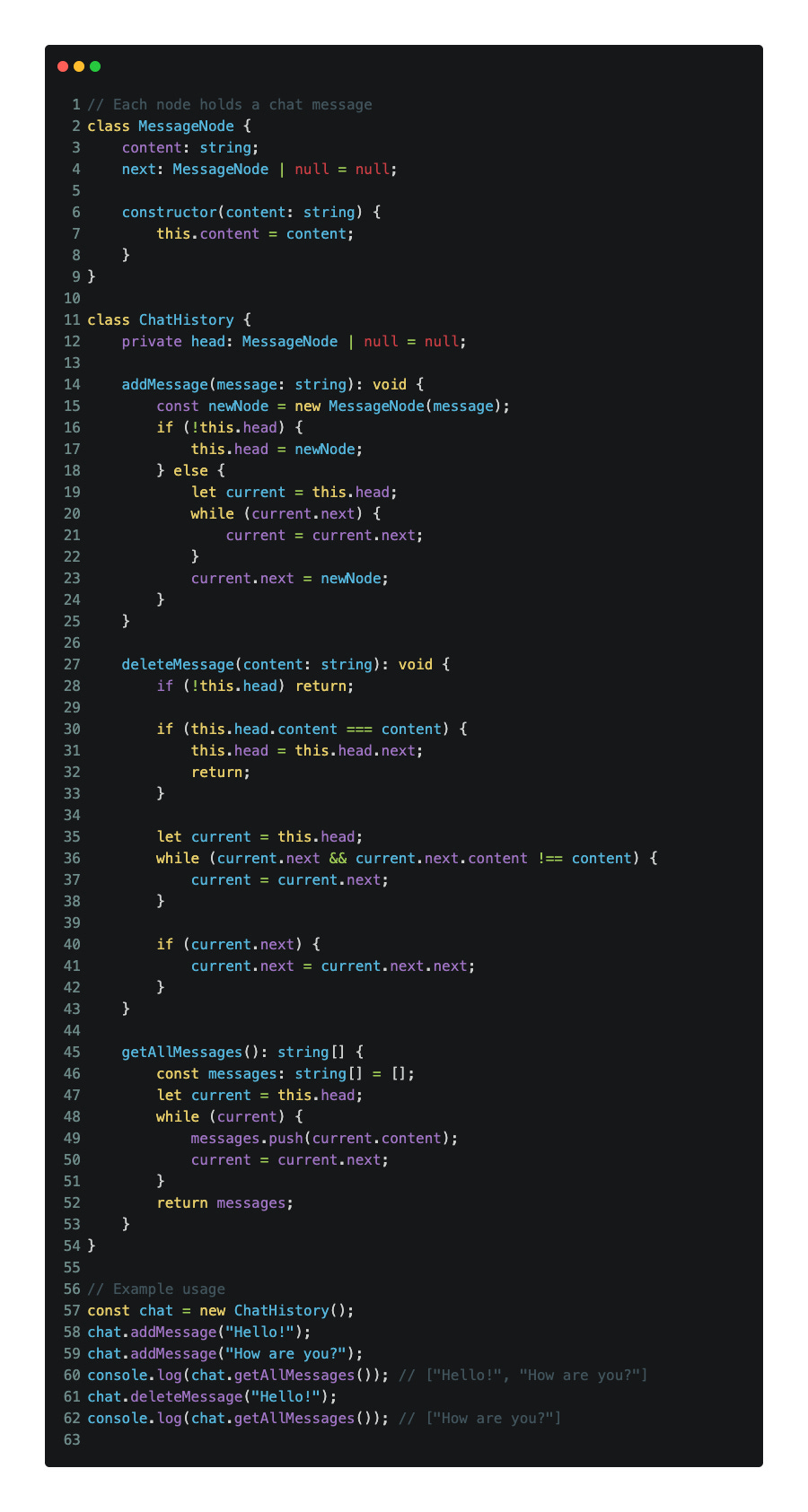
A linked list is a collection of nodes where each node holds some data and a reference (or link) to the next one. Unlike arrays, linked lists don’t use fixed memory — they grow as needed.
There are different types, but the most basic is a singly linked list, where each node links to the next one in the chain.
✅ Key Features:
Grows dynamically — no need to define size
Good for inserting/removing items from the start
Not great for random access (use arrays for that)
🛠️ Use Cases:
Real-time chat messages (where older messages are removed from the start)
Building queues or stacks
Representing chains of data like playlists, logs, or steps
⏱️ Time Complexity:
Add to start:
O(1)Add to end:
O(n)Remove:
O(n)Traverse:
O(n)
💡 Tip:
Linked lists are great when you need fast inserts/removals — but not for fast access by index. For that, arrays are better.
HashMap
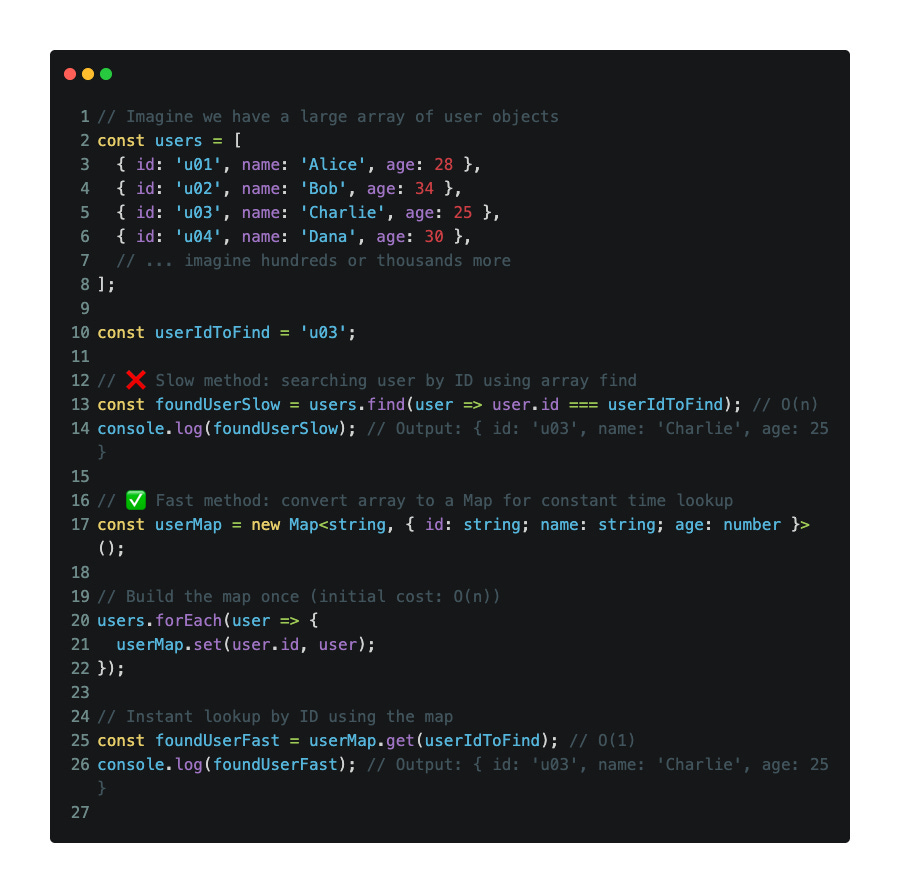
A HashMap (or simply a Map in TypeScript) stores data as key-value pairs. You can use any type as a key — unlike JavaScript objects, which only allow strings or symbols.
HashMaps are super fast when it comes to adding, accessing, or removing data by key.
✅ Key Features:
Fast lookups using keys
Keys can be of any type
Maintains insertion order (unlike plain objects)
🛠️ Use Cases:
Session tracking in web apps
Caching recent results
Storing user preferences
⏱️ Time Complexity:
Add:
O(1)Delete:
O(1)Search (get):
O(1)
💡 Tip:
Use Map when you need a reliable, fast way to manage key-value pairs — especially when the key isn’t just a string.
Set
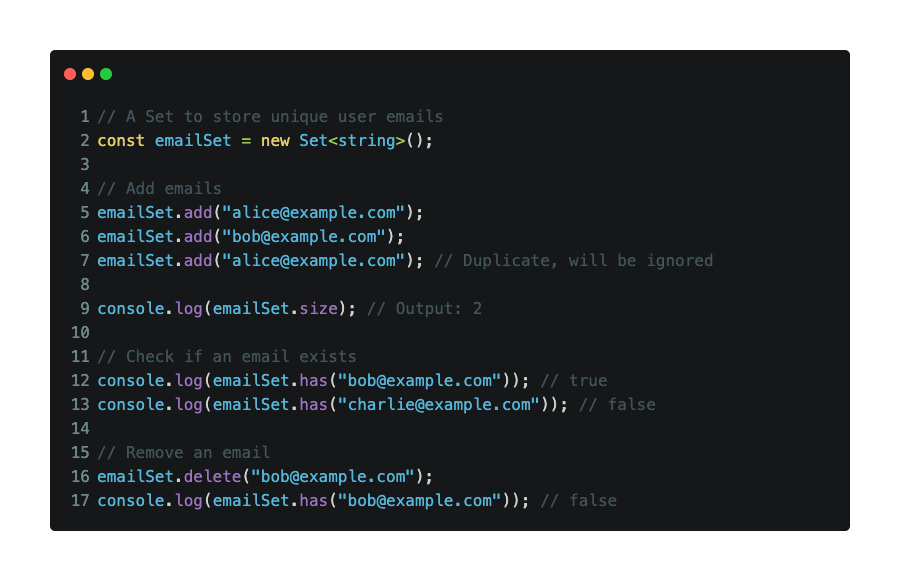
A Set is a special collection that only stores unique values — no duplicates allowed. It’s great when you want to make sure something is not added more than once.
✅ Key Features:
Automatically prevents duplicates
Maintains insertion order
Fast operations for checking, adding, and removing values
🛠️ Use Cases:
Track unique emails or usernames
Prevent repeated API calls or log events
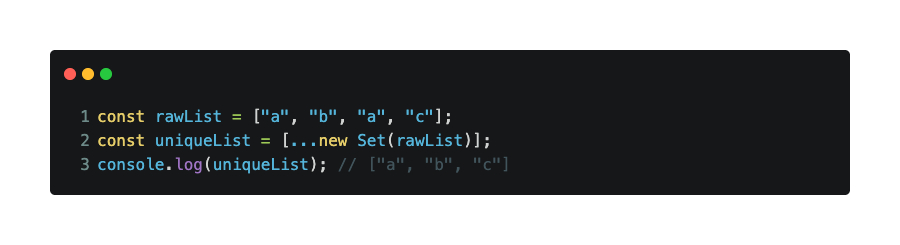
Remove duplicates from lists
⏱️ Time Complexity (average case):
Add:
O(1)Delete:
O(1)Check existence:
O(1)
💡 Tip:
If you ever receive a list with duplicates, you can turn it into a Set to clean it up quickly:
Tree
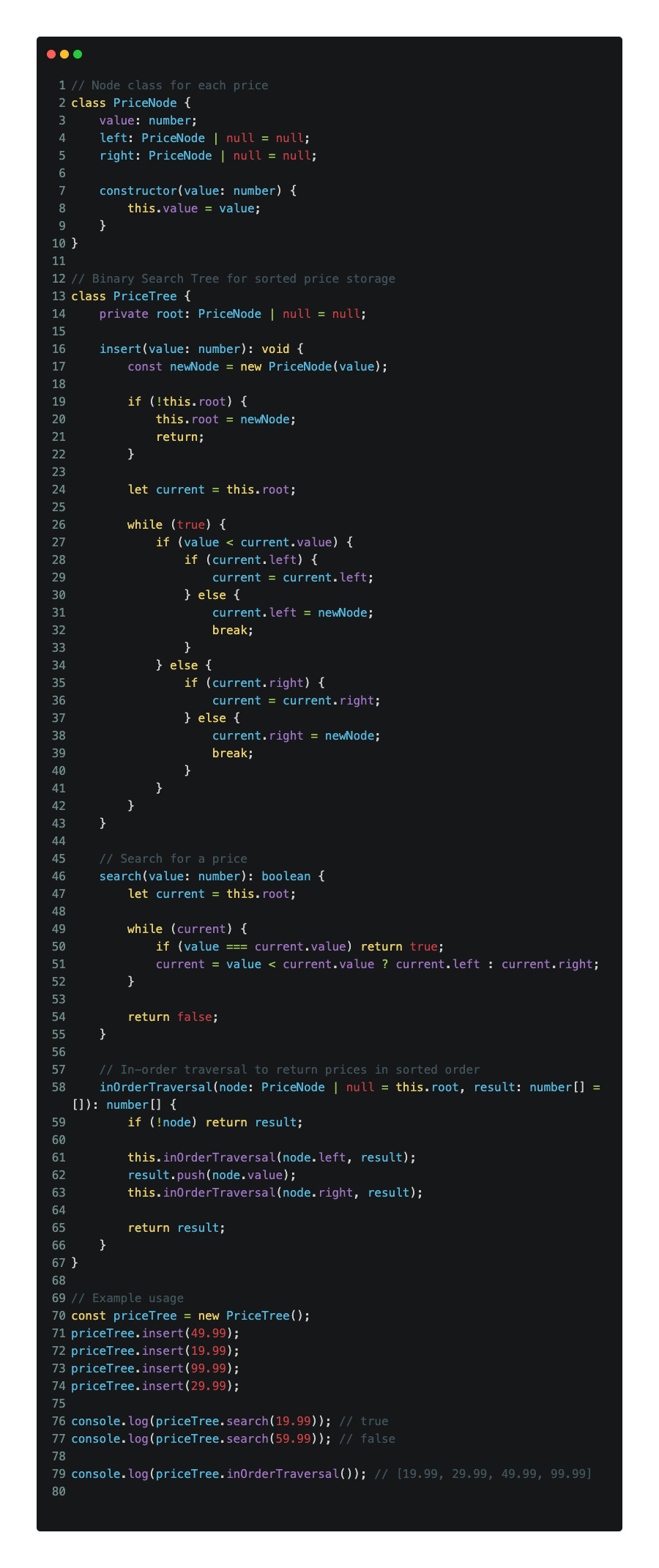
A tree is a data structure where each node can have children, creating a branching structure. One special kind of tree is the Binary Search Tree (BST), where each node has at most two children — and they’re sorted:
Left child < Parent
Right child > Parent
This makes searching, inserting, and deleting data very efficient if the tree is balanced.
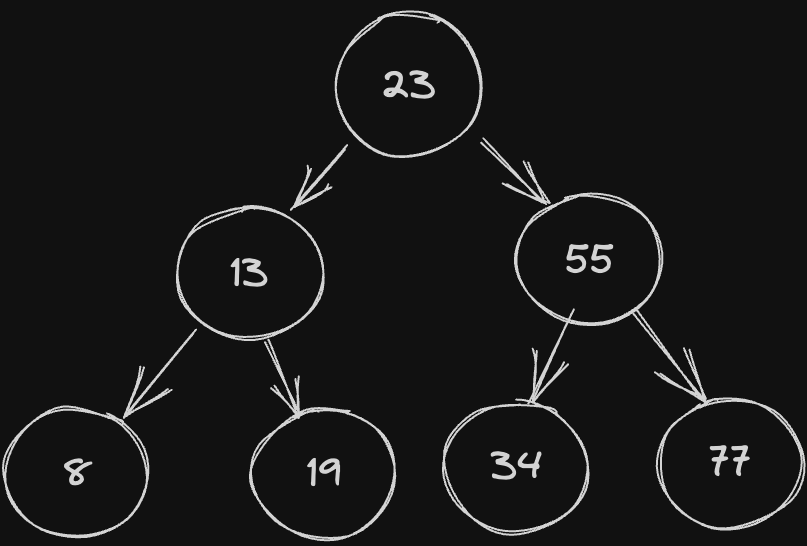
Example of searching:
✅ Key Features:
Hierarchical structure
Efficient for search, insert, and delete operations
Supports sorted traversal
🛠️ Use Cases:
Sorted data (like prices, names)
Searching/filtering in large datasets
Auto-complete systems
Database indexes
⏱️ Time Complexity (in a balanced BST):
Insert:
O(log n)Search:
O(log n)Traverse (in-order):
O(n)
💡 Tip:
For better performance, always keep your BST balanced. Libraries like AVL Tree or Red-Black Tree can help with that.
Conclusion
Understanding data structures like arrays, stacks, queues, linked lists, maps, sets, and trees is essential for writing efficient and scalable TypeScript code. Each structure has its own strengths and ideal use cases. By knowing when and how to use them, you can solve real-world problems more effectively — and write cleaner, faster code.